
Pinterest Conversions: Your 411 Guide to Analytics

Pinterest Conversions: Your 411 Guide to Analytics

There’s one thing we’re absolutely, positively sure of: there’s no point in running ad campaigns if you aren’t paying attention to your campaign’s analytics.

No point at all.

But, to be honest, analytics can be CONFUSING. *chugs iced coffee nervously*

We know this, firsthand — especially if it’s in an ad platform you may not be as familiar with, like Pinterest. Here’s the thing though: it’s our job to get to the bottom of making the most of analytics on EVERY platform, Pinterest included.

Duh. 🙂 

Step 1: Get your tags in order

Facebook has the pixel. Pinterest has the Pin tag. To get the most out of your campaigns, you’ll need to install your tag and make sure you have the correct event. The Pinterest tag (which is just a piece of code you add to your site) is the only way you can really see the true effectiveness of your ads and start getting the right insights.

 You can find directions on installing the Pinterest tag here and then adding event codes here — so do those first, and then make sure you have the right tags in the right places:

  • Opt in thank-you pages: Lead tags
  • Purchase confirmation pages: Checkout tags
  • Cart pages: Add to cart tags

Step 2: Pinterest analytics you need to pay attention to

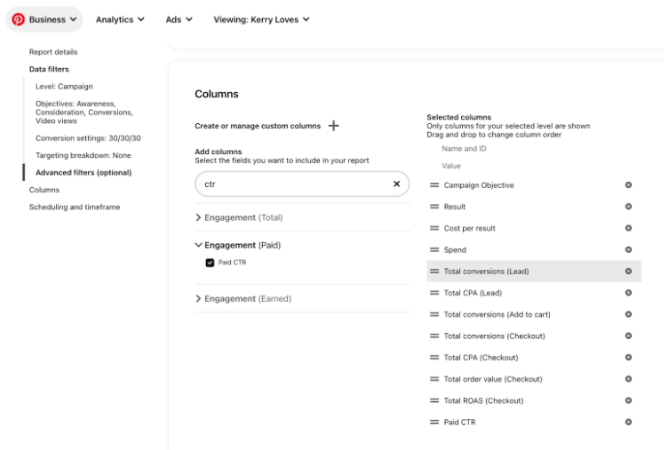
One of the best things about Pinterest analytics is that there’s a LOT to see. These aren’t wimpy analytics at all — they’re incredibly helpful ones, and the platform is packed with pretty much anything you want to take a look at. However, in my opinion, there are so many that the platform can be a leeeettle noisy. To keep it simple, I would focus on these Pinterest metrics:

  • Results (based on campaign objective)
  • Cost per results (based on campaign objective)
  • Total conversions (Lead)
  • Total CPA (Lead)
  • Total conversions (Add to cart)
  • Total conversions (Checkout)
  • Total CPA (Checkout)
  • Total order value (Checkout)
  • Total ROAS (Checkout)
  • Paid CTR

Step 3: Create a custom report!

Now that you have your tag installed and know what analytics to consistently look for, you can make life reeeeeaaal easy on yourself — and get monthly reports automatically generated and sent to you (!!!)

Here’s how:
It’s super easy — and it’s such a game-changer. We’d definitely recommend automating this (just makes it simpler for all involved), but it’s up to you. Then, to really be the most efficient ads-runner ever, take a few key points! We always like to look at the results from the month, dig into what went well, dive into what could be better, and pull out top performers and creative insights, too.

And, there you have it! Your ultimate Pinterest conversion guide — now, get after it!



New Ideas for Ad Graphics

New Ideas for Ad Graphics

If there’s one thing we can all agree on in the world of course launches and Facebook ads, it’s that it can be really easy for everything to start looking the same. And, let’s be honest: this makes sense! It’s hard to constantly reinvent the wheel — we get it.


Here’s the thing, though: making sure that everything *doesn’t* look the same is really a key part of running successful ads. See, if all of your ads look and sound the same, your audience is going to get fatigued… and quickly. Often, this is why we see once top-performing ads become low performers, and it’s why we have to work so intentionally not to fatigue offers with our clients’ audiences.


So, what do you do, you ask? Well, you’re in the right place pals — because as usual, my team has you covered.


The trick to ad graphics and course graphics

If you’ve been here awhile, you’re probably going to guess what I’m about to say here. The trick to ad graphics and course graphics is testing multiple versions — and testing those multiple versions consistently to inform NEW strategies and NEW tests.

Say that five times fast.

But, truly: testing new versions of ads, their creative (graphics, copy, targeting, naming, you name it), and their reach is truly the best tool you have in your toolbox for avoiding ad fatigue and making sure that you’re reaching the right number of people with your ads. Plus, if you’re consistently testing new versions of captions, graphics, and audiences, you start to get a feel and a read on what your audience tends to like — and you can use those well-performing tests as formulas for different ads. This helps you shake up your ads — and avoid fatigue — while taking a lot of the pressure off of your team to endlessly create.


Need some new ideas for ad graphics and course graphics?

Over here, we’re always knee-deep in a course launch or similar launch for our clients — which means that we’re constantly needing to up the ante through tests and versioning over here. Luckily for us (and for you!), we’ve learned a LOT through all of that testing and versioning, and we’ve been embracing the results with some new ideas for ad and course graphics:

Gifs, please!:

Audiences love any type of creative that moves and engages them, and any type of ad with video or movement tends to perform really well — so try a gif! We’ve been doing this a lot with carousel-type posts. Instead of utilizing the traditional photo carousel, turn it into a gif. Voila!

Face or no face?:

We’ve been testing a lot of different versions of graphics both with AND without the course creator, and have seen really good results from both. To shake it up with your audience, create 2 versions of every graphic — one with your face and one without — and see which tends to perform better with what audience.

Keep in mind, for Pinterest ads and colder audiences, you want your logo on the image for that brand recognition. Sometimes your brand IS your face, where you’re easily recognizable to your audience because they know you. Try adding your name (or your logo!) instead of your face!


Numbers on images:

Humans react well when they see results and measurements (shocker…) and this goes for ads, too — so try out text on your ad images with numbers to quantify your offer. For example, call your offer something like “ the course with the 10,000-person waitlist,” “the guide to 10xing your traffic,” or “42 lessons, 6 live sessions, 6+ months of content.” This is a really helpful way for your audience to start seeing how your course could help them instantly, and is also a good way to appeal to that logic-filled side of their brains.

See, in all honesty, it all comes back down to testing. Try new things, test them out, and reap the rewards — it’s that simple.


You’ve got this!

Double Your Efforts with an Evergreen Webinar

Double Your Efforts with an Evergreen Webinar

So, it’s absolutely zero secret that every single one of us loves a successful launch.

I mean, obviously.

But guess what’s better than a successful launch, friend?! Evergreen sales, baby. After all, launch money is great — but continual, passive sales puts the icing on the cake (and the candles, too). 

And, guess what? There’s a simple way to get you there: create an evergreen webinar.

Lemme explain.

How can I double my efforts with an evergreen webinar?

Setting up an evergreen webinar funnel after a launch — or, hey, even without one, if you want to generate passive product income — is truly one of the best tools you have in your toolbox to create constant leads and sales. By digging into the things your audience wants to see and aligning it with the work you do, you can truly create a goldmine of people who want to learn and buy from you — and then, you can direct them organically to a sales page, a booking link, or a product page… time and time again.

What do I need to create a successful evergreen webinar?

The secret to a successful evergreen webinar is simple: make it timely (for instance, what’s a topic that aligns with your latest launch or product? What’s a hot topic in your niche that people want to know about?), and then engineer it to have a strong CTA at the end. This CTA can be to buy your product at a discount,  or it can be funnelling them into an email sequence that builds on your webinar topic and leads them to purchase.

Ready to create your own? Here’s your checklist:

  • Webinar content
  • CTA options (we love to test!)
  • Ad creative
  • Sales page or other lead capture
  • Strong email funnel


What if my webinar funnel isn’t working?

Underperforming webinar funnels are sometimes par for the course, but they’re also diagnosable — and you can quickly transform an underperforming funnel into a thriving one. 

First, start by diving into your ad campaign’s analytics — are people clicking? If not, adjust the targeting and creative. 

Then, move on to the landing page. Are people opting in? If not, adjust your copy and make sure it’s enticing and aligned with your ad’s messaging. 

Then, go to the webinar. Are people hearing your offer? Likely, if your funnel is underperforming, this is where it starts — because people are falling off. Instead of scrapping your entire funnel and campaign, try re-recording your webinar. Include the offer earlier, pack it with more value, and make the beginning stronger so that people are hooked from the jump.

After you’ve locked down your webinar, look into your emails. Are people opening your emails? Are they clicking? If not, you either need a stronger offer or a stronger email sequence.  If you’re unsure of what needs to be changed, it’s a great time to poll your audience. 🙂 

Whether you’re building a new evergreen webinar funnel or trying to strengthen an existing one, trust me on this: if you do this right, it can totally change the game for your sales.

The 411 on Dynamic Creative

The 411 on Dynamic Creative

If you’ve been around the Facebook ad world for even, like, 5 minutes… you know the term “ad creative.” Basically, you hear it again and again — because these images, captions, videos, and graphics form the visual cornerstone of all things ads.

Plus, if you test your creative the right way, you’ve unlocked a gold mine.

But, guess what? There’s a lot more to creative than just, well, creative. Typical, huh?

Enter: dynamic creative.

What’s dynamic creative?

Dynamic creative is a newer Facebook feature that automatically mixes up your ad creative to serve different audiences. This was built to avoid the same audience seeing the same creative mix time and time again in your ads — and designed to help you continually test which creative mixes work the best with your unique audience.

When you have dynamic creative turned on in the Ads Manager, Facebook will continue to adjust your ads and create different variations — while all the time learning from the different variations, impressions, and performances. It can be immensely helpful for testing, and it also typically leads to a better cost per lead.

Here’s the thing, though: dynamic creative has its pros, but it also has its cons. Often, the optimizations end up not making a ton of sense — so sometimes, you’ll get cut off text or cropped images. This is because we typically run square images (1080px by 1080px) and story images (1080px by 1920px), and good ol’ Facebook might swap these on someone’s feed.

Should I use dynamic creative in my ads?

So, here’s the thing: dynamic creative is definitely worth trying, and Facebook will encourage you to use it. It can lead to a significantly lower cost per lead, and it can help you test. However, we’ve seen just as much success from breaking out ads the traditional way with Facebook — AKA, testing our separate versions of ad creative on our own.

Also, it is a personal choice. For obvious reasons, some of our clients care about their image and how they show up on your feed. Depending on how FB wants to crop an image, it might cut off some all-important text, and the ad isn’t as compelling, or just doesn’t make sense. On the flip side, some of our clients don’t mind. They’d rather have the lower cost per lead and let FB do its thing. The FB algorithm picks up on the winning combination fairly quickly, which will help optimize the campaign.

To decide which you’d like to use, I’d recommend, well… TESTING (my favorite word!) both of these in your own ads. Try out dynamic creative, but keep an eye on things like image text and variations — because it might get a little funky, which you (and your clients) probably won’t love. Alternatively, try testing different versions of your creative (our go-to practice over here at System Envy).

Want to give dynamic creative a try?

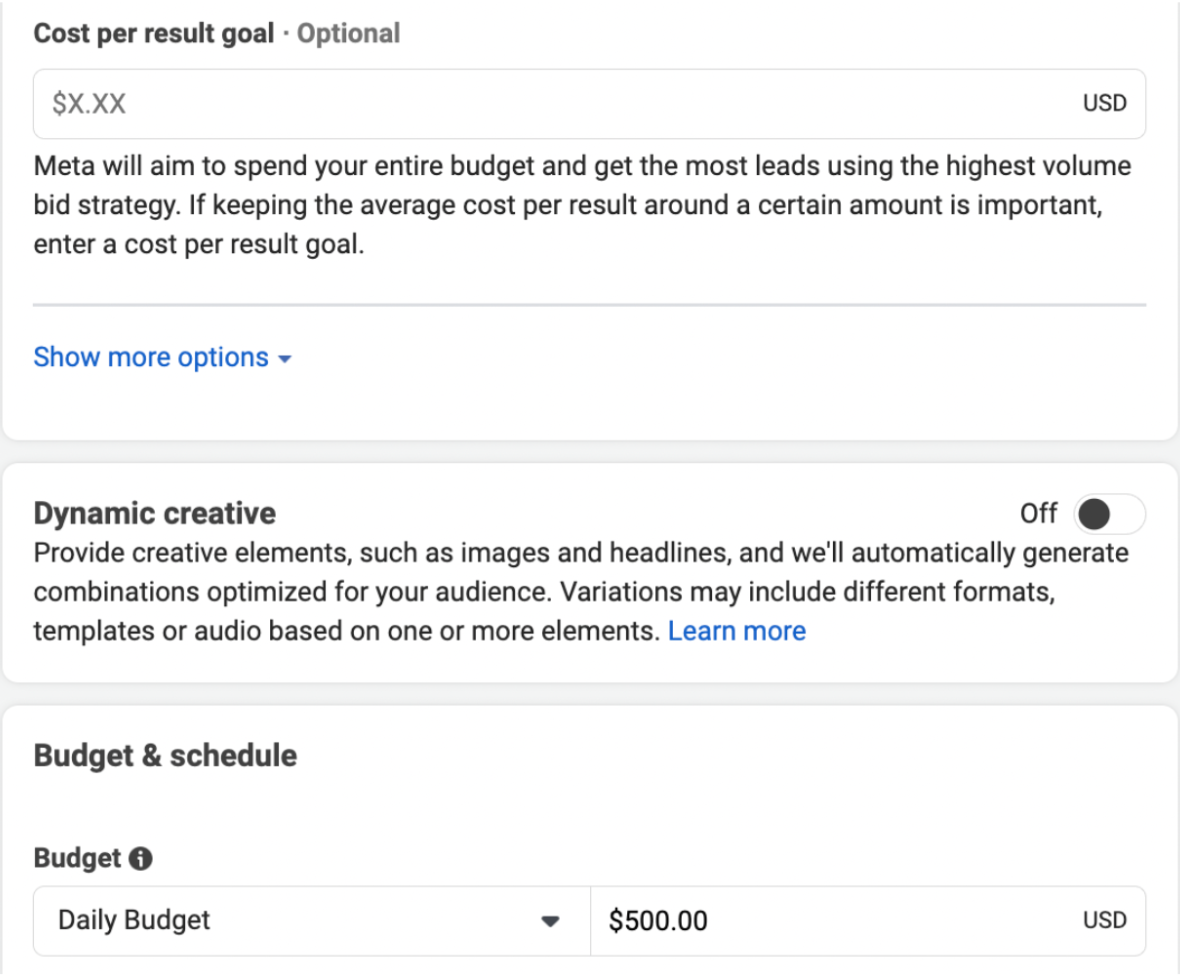
Go for it! Just proceed with caution if you’re particular about your creative. 😉 To try it out, go to the ad set tab right above the budget section and toggle the switch to on! You’ll then be prompted in the ads tab to upload all of your image versions, copy and headline versions into ONE ad. And FB will do the rest!


Looking for more ad tips and insights? Stay plugged into the System Envy blog — my team and I will be diving into all things ads over here, as usual.

Your Guide to Advertising on TikTok vs. FB/IG

Your Guide to Advertising on TikTok vs. FB/IG

To say that TikTok has become a HUGE FREAKIN’ DEAL is a bit of an understatement.

There are over a billion active users on the platform (!!!), users spend an average of 95 minutes per day on the app, and it’s become a thriving spot for people to grow huge numbers and followings.

Basically, it can be a goldmine in a lot of ways.

We’ve been knee-deep in learning the TT ads platform for the last year over here at System Envy, and we’ve been diving into the ways that our clients and readers can make big money via advertising on the platform.

Here’s the thing, though: when it comes to ads, there are some big-time differences that you need to understand, especially when compared to Facebook and Instagram ads.

You curious? Let’s dive into the pros and cons of TikTok advertising vs. Meta advertising (AKA, Instagram and Facebook).

First things first… understanding this about TikTok is key:

When new platforms launch — especially super popular ones — it’s human nature to want to start advertising on them… and quickly. However, it’s always, always going to be a better practice to do your due diligence on the platform in question — especially since no platform is the same.

TikTok is no different there.

See, here’s the thing: Facebook and Instagram are known quantities in the ad world. While we see big algorithm changes on the platforms from time to time, the way people behave on both of these platforms has stayed fairly consistent for years now. When it comes to TikTok, though, we have a different beast.

Unlike the Meta platforms you’re likely more familiar with, TikTok is really more of a discovery platform (think: Pinterest-esque). The users on TikTok are likely familiar with being advertised to on Facebook and Instagram, but they’re certainly not expecting that type of advertisement when they scroll down their For You Pages. To create ads that actually make an impact, you have to understand this — and, in turn, create entertaining, engaging, short, and snappy videos that feel in line with the type of content they’re already expecting from TikTok.

This is why we always, always recommend that you spend a nice chunk of time in a research and discovery phase before advertising on TikTok. What is your ideal audience looking at? What are the kinds of things that attract their attention? Repel it? This matters.

Now, for the PROS of advertising on TikTok (and, uh… the cons)

We advertise on TikTok for quite a few of our clients, and we definitely foresee continuing to do so in the future. However, just like with annnyyyy advertising platform (trust us… any of ‘em), there are pros and cons.

Pros of advertising on TikTok

So advertising on TikTok is pretty freakin’ effective (makes sense, huh?), and we’ve actually seen a cost-per-lead that’s competitive with FB and IG ads. Plus, there are a few benefits to TikTok advertising that we really love.

First, you can set up events in TikTok with your URL, which is super handy. For instance, on FB or IG, you have to set up an event by adding a pixel tag to your website code — and even though FB/IG has an event set up tool, TikTok is a lot more seamless for this. It’s so, so easy, and gives more authority to the ads team to set up the code.

Next up in our fave pro of TikTok is a SUPER efficient feature that lets you reply to allll ad comments… which is so nice. You can filter, select certain ad groups, and find out info about the comment (for example, you can see whether the comment is positive or negative, and you can even see if it contains a question). Meta has nothing like this, and it’s SO freakin’ helpful for organizing comment moderation when you have multiple campaigns running.

Cons of advertising on TikTok

Nowwww, with pros come cons. ‘Tis life. And, in our opinion, TikTok kinda has a big con: the difficulty of setting up audiences. Basically, TikTok doesn’t let you set up audiences in the same way FB/IG does (with matching email addresses and names), which is a pretty big bummer. 

It only allows you to upload Apple IDFA (Identifier for Advertisers) or GAID (Google Advertising ID) IDs, which isn’t available from most email marketing software — making it pretty much impossible to set up custom audience lists and lookalike audiences. This is a huge con, since creating those types of audiences is a really big marketing tool… and one we find highly successful for our clients. They perform really well, and make a pretty stark difference.

Apparently, TikTok is working on this (whoohoo!), but for now, it’s a massive limitation on targeting capabilities. Whomp, whomp.

So… should you advertise on TikTok?

Short answer? Yes, you should advertise on TikTok.

Long answer? You should advertise on TikTok in conjunction with FB/IG ads, and not on its own — at least, not right now. By diversifying your ads, you’ll be able to reach more people AND take advantage of things like custom audiences on the Meta platforms.

Have more q’s about this? We’re your team, always — just let us know!

How Our Pre-Launch Strategy Supported A +$560K Launch

How Our Pre-Launch Strategy Supported A +$560K Launch

As you know, launches are the name of the game over here — and helping EVERY single client we have, every single blog reader we have, and every single email list subscriber we know is paramount to what we do.


No gatekeeping over here. Ever. 😉 So to make sure you always know how to rock your next launch with Facebook ads, we’re kicking off a new case study series where we share a success story from one our six-and seven-figure entrepreneur clients over here at System Envy.


Introducing… How our pre-launch strategy supported a $560K launch!


Who: System Envy client with a course (at a $297 value), an established warm audience, and a long break from live launching — she hadn’t run this course live in 2 years (!)


What: Though we’d been running evergreen course content for years, this particular launch was a live webinar-style launch. In the months leading up to the launch, we focused on engagement and on long-term planning. We strategically ran freebie ads and relevant engagement ads — so her audience was warm and ready to go.


How: We approached this live webinar-style launch with the following ads in strategy:

  • live webinar
  • webinar reminder
  • webinar replay
  • cart open
  • cart close 
  • last-day ads


The numbers: 

  • The estimated launch revenue from our ad strategy was +$560,000 (which was more than 50% of the total revenue generated)
    • Note: this is just what we could track inside Ads Manager. The overall launch actually resulted in around $1M of revenue
  • Estimated return on ad spend: over 300%
  • Around $5/purchase return (on a $297 offer)
  • Doubled the number of purchases since the last launch, even with a 33% increase in the price of the course


The takeaways:

This was a hugely successful launch, and — as all launches do — it taught us a lot! Here are our two biggest takeaways from this launch. These are what we felt moved the needle by and large:

  • Warm audiences are SO, so important (they are almost always our top performer by far). How do we get massive pools of warm audiences? People tend to think of ads only for launches but the truth is, pre-launch is just as important for launch strategy as the actual launch. Don’t skip it. Run engagement ads, boost your pre-launch reels (be strategic, don’t boost your cat…boost the reels with content that is aligned with your live launch subject), host a live on Facebook or Instagram, ask questions in your posts and ads. These are great ways to build large, warm audiences quickly ahead of a live launch. 
  • Video content was a huge hit! We really focused on ads talking to the camera, specifically with our client holding the phone in front of themselves and speaking directly to their audience! This is usually a huge hit during the launch, and we saw that confirmed during this one
    • Fun fact: We provide ‘video wishlists’ to clients and these types of videos are always on there for a launch. We’ve shared that list on the blog!
    • Pro tip: Utilize live launches as a way to regularly freshen up your evergreen campaigns for your course. When you’re filming your live launch ads, film an extra version or 3 taking care to not speak dates or words to identify it as a live launch. Then, once your live launch is over, you already have video ads ready for your evergreen campaigns. 


And, there you have it — a dive into one of our client launches. While you obviously want to be highly strategic, there’s a LOT to be said for a warm audience and engaging content. 

Stay tunedwe love to share client success stories!

My Top 8 Tips as an Agency Owner: Launch Edition

My Top 8 Tips as an Agency Owner: Launch Edition

Over here, launches are the name of the game. From memberships to courses to digital products, our clients are always launching the latest and greatest to their audiences — and there’s nothing we love more than to see it (and to support them through it, too).

And, over a long period of time doing this kind of work, our team has compiled a ton of best practices, tips, and tricks for helping our clients and our audience have kick-butt-level launches every single time.

As a thank you to you for being here and showing up with me, I wanted to share my top 8 tips as an agency owner: course launch edition!


1. Set goals based on real data.

Course launches involve real numbers — and running ads costs real money, so why not set goals based on real data? Dive deep into your audience, set measurable goals, and make sure that you’re considering data from past launches, past offerings, and past goings-on in your business so that you’re able to help those goals come true.

And, at the same time, make sure that any goals you have — whether they’re for your own launch or that of your client — are realistic, too. While dreaming big is always, always recommended (duh!), you want to make sure that you don’t end up disappointed because you didn’t create the right goals. Data plays into this!


2. Plan FARRRR in advance.

Building an effective course strategy takes time, and sometimes it takes quite a lot of it. Make sure you give yourself a runway (we typically recommend up to 6 weeks), and utilize tools like Asana to build out a timeline that makes sense for your launch.

When planning, remember the different stages of a launch — from warming up the audience allllll the way to cart close — and take the time to intentionally plan out the copy, creative, and strategy for each of these steps. It truly makes all the difference.


3. Repurpose, repurpose, repurpose.

You do not have to reinvent the wheel every time you launch a course or an ads strategy — and, in fact, you shouldn’t. Work to always repurpose templates and resources you’ve built in the past (we consistently reuse launch trackers, budget layouts, ad grids, URL worksheets, and more), and remember to repurpose content, too.

You can usually create killer copy from an existing sales page, you can utilize existing brand imagery for ad creative, and you can take everything from Story posts to Reels for engagement content. Make it easier on yourself, friend!


4. Communication is key.

When you’re bringing a launch to life, there’s almost nothing more important than communicating often, early, and well. Get ahead of any questions in advance by planning and organizing well, and then continually have conversations to get up to date on details, approvals, and everything in between.


5. Triple-check (and set up in advance).

Running effective ad campaigns usually means that you’re dealing with a lot of moving parts, so focus heavily on quality assurance. Over at System Envy, we’re big on checklists to QA every ad that’s prepping to launch — and we also, yet again, give ourselves a big runway to try and manage kinks in advance.


6. Wait for the learning period.

When you push ads live, it’s super important to resist making any edits unless there’s something majorly business-critical that needs to be changed. When you do this, you risk resetting the learning phase of the ad, which can seriously impact the performance — and it’s hard to tell what’s working, what’s not, and why.


7. Test during the pre-launch period for the best results.

While testing can be done during a launch (with limitations), focus more on doing so before, during the pre-launch period. By testing graphics, copy, creative, strategy, targeting, and more, you can start to know what phrases, lingo, headlines, and graphics spark action in your prospects.


8: Deep dive.

After your launch has concluded, deep dive into your data (it pays off)! Compare your current launch performance with past launches and the current ad landscape, and then compile all of your learnings (from audience to engagement to the creative that worked the best), and track it for next time. By doing this deep dive, you can make your next course launch run even better — and, ideally, you can save yourself some time.
(Psst… if you’re running launches for your clients, make sure you communicate results and communicate your deep dive. We usually use a post-launch report for this, and also love using Looms to make it even easier.)

While these 8 tips certainly don’t encompass every single learning we have, I can promise you that these tips are a LOT of it — and if you can implement these steps into your next launch, you’re in a great spot. I’m so proud of you already!

The Ad Course Strategy We Swear By

The Ad Course Strategy We Swear By

Over here, course launches are a BIG part of what we do — and they’re also a big part of what makes our clients so incredible to work with. After all, what’s better than helping our clients show off their incredible courses to the world? From helping students transform their lives and businesses to teaching them how to navigate entrepreneurship and marketing, it’s the best thing to watch… and to help them succeed with.

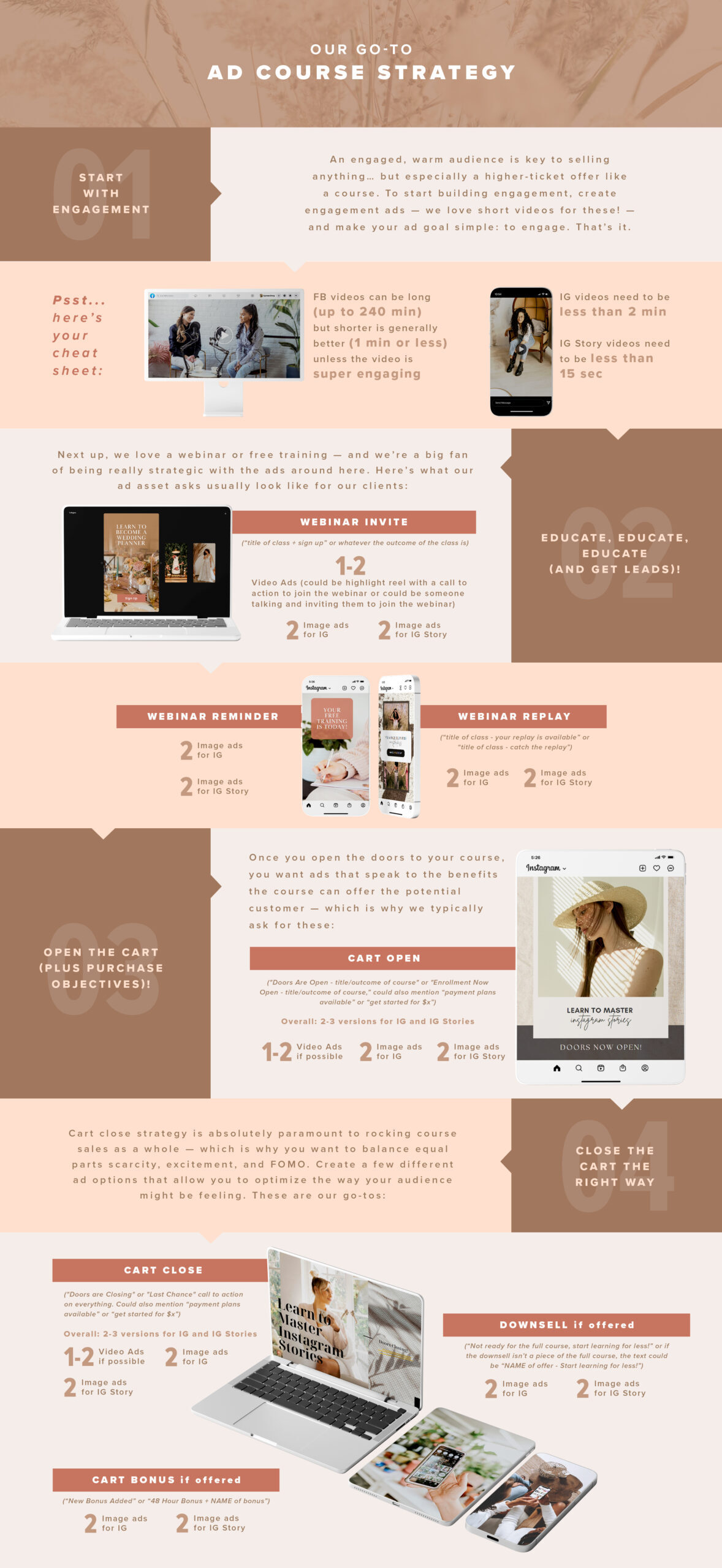
Plus, you know we don’t gatekeep over here — which is why we want to share our very own ad course strategy with you! Click on this image to screenshot or save this infographic for your next course launch.

Here’s what to remember more than anything else: you have to trust the process. Running ads for any launch — especially a course — requires some patience and some strategy. While we’ve found that our strategy pretty much…eh-hem…rocks (truly), it’s completely normal to need to tweak and adjust as you go. Now, go have fun!

Getting the Most from FB Reps & the FB Helpdesk

Getting the Most from FB Reps & the FB Helpdesk

When you’re running ads and trying to manage campaigns, there is pretty much nothing worse than tech issues affecting your ad performance…. Especially when it comes to campaigns being shut down.


Well, nothing worse besides, um… managing the tech issues and not knowing where to start.


SIGH.


Here’s the thing, though — while FB Helpdesk can be hit or miss (it’s true… it rly is), it’s also necessary to navigate regardless when FB issues arise that are out of your control. Here are some overall best practices to help with FB’s Ads Manager.

  • Monitor Meta performance in Ads Manager daily. You’ll want to get comfortable in the platform, so if something is amiss, you can try to get ahead of all alerts. As you probably know, “set and forget” is not the strategy here.
  • Understand and be aware of Meta’s Advertising Policies. Their policies change, often. And so does Digital Marketing as a whole. Seemingly on the daily! Make sure you keep up to speed with any changes or new rules in the platform so you do your best to get ahead of updates. Subscribing to newsletters, listening to Meta Ad podcasts, and hey, what you’re doing right now, reading this blog, will also help you stay in the know.
  • Don’t panic when the inevitable happens. I’ve had my fair share of issues with the platform. Whether it’s an ad that isn’t delivering, a campaign that keeps getting rejected, or (the worst!) being locked out of your account, know that this happens. With a little patience (or a lot), you can use this resource to get the most out of the helpdesk.


Playing nice is key, which is why we have a few tips for making communication work the best you can when an ad is shut down.


First up, don’t let small problems become big ones in the first place.


While there are about a million possible issues for your FB ads, a lot are preventable. The key? Daily check-ups of Meta ad performance, daily ad monitoring, and an understanding (and following!) of Meta’s advertising policies. Your payment method is also a good thing to monitor. You know as a business owner, if something is amiss with a CC on file, issues will likely be escalated. Also, remember: ads can take up to 48 hours to start working, and you’ll be notified if an ad is rejected or disabled. Don’t panic — just be aware of the process and the way it works.


Next up, have a communication tactic ready for when a big problem arises.

As you may already know… FB reps and Helpdesk services can be all over the place. However, they can be managed the right way if you have the right comms in place. Enter: your go-to “help!” email (because, guess what? At some point you will need it). 


Do your due diligence to gather as much intel as possible before you reach out to FB, and make sure there’s not an issue with the ad itself. You can diagnose the problem via this link first, and then request a manual review with a communication template like this:


Hi!

Please help! Looks like our ad [ID #] has been shut down and disabled incorrectly, and we’d like to request a manual review. We’ve read through to make sure we’re following policies correctly, and would really appreciate your help with a manual review.

Thanks so much!


Then, while you wait, reach out to the Meta Helpdesk with your ad ID and the concern to try and diagnose the problem sooner. Remember that kindness is KEY, and trust in the process. Just show up prepared with info and documentation, and make sure you advocate for yourself.


Now, if you don’t have access to the Meta Helpdesk through this link, you may feel out of luck, but there are workarounds. Even if you don’t have your own personal FB rep, make sure to do your due diligence. There are actually some handy resources in their platform.


Plus, here’s the kicker: everyone — everyone — has issues with ads sometimes. There’s simply no way not to, and it’s something you’ll deal with. Finding a community of ads people can be really helpful. Always feel free to reach out to others who are running ads for advice and guidance, as issues and trends tend to be quite common. Even if it’s just to commiserate! You aren’t alone in this. However, following these best practices for communicating with FB can make the problems disappear a lot faster.


Promise.

How to Set Up a Sale with Ads

How to Set Up a Sale with Ads

Using ads to scale your business is pretty much, well… the coolest thing ever. After all, ads have some seriously magical power when it comes to helping you sell your offers, launch your programs, and grow your audience.

And, guess what? Ads are also PERFECT for helping you sell your offers on sale, too. (Word jumble, anyone?!)

So if you’ve wondered how to successfully set up a sale on your product/course/membership with Facebook ads, we’ve got you covered! Sales are a big thing for our clients, especially since so many of our clients have high-ticket offers and really engaged audiences. 

First up, gather alllll of your deets in one place.

When you’re prepping to run sale ads, you need to get all of your info sorted, strategized, and in one place. Whether it’s during key sale periods like Black Friday and the New Year or during any random point in the year, we allllways have sales going on — and here’s what you’ll need:

  • Dates of the sale: When do you want to open and close cart for your sale dates? Do you have a drop-dead date in mind?
  • Budget: What’s your budget for this ad campaign? Have you nurtured your audience enough to make that budget realistic?
  • Sales goals: At the end of this ad campaign, what do you want your results to be? Conversions? Revenue? There’s no wrong answer here!
  • URLS: You’ll need the right URLs for your sale landing pages, so paste those into a Google Doc!
  • Messaging: How do you want to talk to your audience about the sale? Go ahead and start writing that copy, and then strategize that in advance.

Then, follow our project management steps to get your campaign running (and successful)!

Next up, it’s time to get the ads running! These are exact workflow steps we use to rock it with sale ads, so feel free to swipe:

  • Create a section in Asana for the sale (or whatever project management tool you love!)
  • Create image and copy tasks in Asana (what images do you need? How many captions?)
  • Assign copy to be due in the next 2-3 business days
  • Have ad manager review the text on image task, then assign for the next 2-3 business days
  • Create a task for ads manager to set up the ads 2-3 days before the date
  • Create a task for any follow-ups needed. Here are the follow-ups we usually have:
    • Final budget
    • Final URLs
    • Verification of pixels 
  • Create a task for Post Sale Report due the day after the sale ends

You’re ready to go, friends! Have fun, and remember our top recommendation always… TEST!